OCT 12 October 12, 2021

Rails 7: Fix yarn missing on Heroku - When deploying Rails 6 sites to Heroku, the Ruby buildpack would detect if the webpacker gem was installed and install yarn for you automatically. With Rails 7, webpacker is no longer installed by default, so using jsbundling-rails and extras that require yarn to be installed will cause deployment errors on Heroku.

The fix is to install the nodejs buildpack. This needs to be done before the ruby buildpack. As follows:

heroku buildpacks:clear
heroku buildpacks:set heroku/nodejs
heroku buildpacks:add heroku/ruby

After running these commands your deployment to Heroku will work great.


OCT 11 October 11, 2021

Rails 'new' customizations for Rails 7 - With Rails 7 and its plethora of new javascript and css configuration options and flags, it can be quite challenging to remember just what these options are when creating a new app.

For quite some time Rails has had the ability to read in a config file you have in your home folder named .railsrc This file contains the various flags you would otherwise pass into ‘rails new’ manually. By putting your preferred options/flags into this file, every Rails app you create will be created consistently and just the way you like it.

I prefer postgres as my database and esbuild for my javascript processing and tailwind as my css framework. So my .railsrc file looks like this

--database=postgresql
--javascript esbuild
--css tailwind

Now I just start a new Rails app with

rails new brilliant_app_idea

And my new app is ready to rock configured just the way I prefer.


APR 9 April 9, 2021


Using specific Node JS versions in Github Actions - Sometimes you may want to run your Github Actions using a specific version of NodeJS (eg version 8). This can come in handy if you are dealing with a legacy application and needing to compile a specific version of node-sass for example.

The way to do it is to add the following lines into your workflow file.

- uses: actions/setup-node@v2
  with:
    node-version: "8"


See what javascript caused an attribute to change - I was working on some front-end code today - and when I clicked on a checkbox it mysteriously shrunk. I mean its height was set to 0px when I clicked on it. It was so strange. Some code somewhere was adding a style attribute with height: 0px. Searching my codebase I couldn’t find anywhere where this was happening.

To solve these sorts of issues, Chrome (and I’m sure other browsers) have a feature in the dev-tools where you can stop execution and see what is happening under the hood so to speak - in other words see what javascript is running at exactly the moment a particular event happens on the DOM.

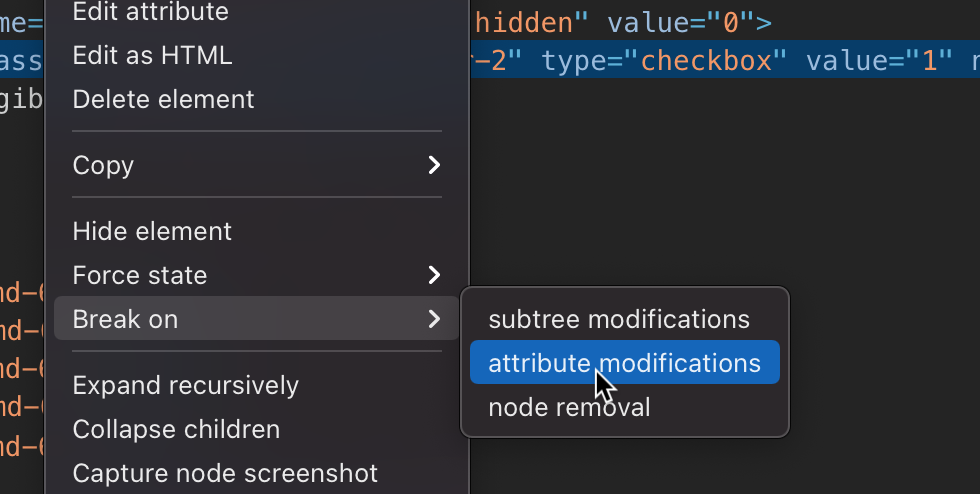
To access this feature - open up dev tools - and select the element you want to watch change. Right-click the element and in the Break on fly out menu select attribute modifications.

Attribute Modifications

Now you will need to trigger the event. In my case, I clicked on the checkbox. Execution stopped and the browser popped up the exact code that was causing the checkbox to have a style attribute added.

A very handy feature.


FEB 10 February 10, 2020

Execution order of after_commit and after_rollback ActiveRecord callback - Rails allows the adding of various callbacks that trigger during the lifecycle of an ActiveRecord operation. The standard callbacks are before_validation, after_validation, before_save, before_create, after_create, after_save, after_commit, and after_rollback.

These are documented quite extensively in the Rails Guides and the Rails API documentation.

The documentation is quite good at showing you the order the callbacks are executed - eg before_validation fires before validate which fires before before_save etc. Most of these validations execute in the order they are defined. For example, if you have two before_save callbacks defined, then they will execute one after the other.

[read more...]


FEB 11 February 11, 2017

The Key To Winning In Business -

I have turned entire businesses around with this tactic and I encourage you to at least try it for one week and notice the positive difference.

Stand outside an Apple Store 10 minutes before they open and you will see a team meeting. Have a look at your favourite sports team before they play, they are having a team meeting. Every army command has a briefing before they do their mission. Every successful team, or team trying to win, has some sort of team briefing before they start a game. In a business environment, the “game” is that days trade. And its critical to the success of your business that everyone going into that day is armed with all the information and motivation to help you achieve your goals.

One of the biggest positive impacts in my career was the consistent use of morning meetings to inform and motivate my team.

What is a morning meeting or pre-game huddle? It’s an opportunity to brief the team on the upcoming days events, goals, challenges and generally getting everyone on the same page. There is a lot going on in any given day. Bringing everyone together for 5 minutes is healthy, easy and tremendously effective.

How do you conduct a morning meeting?

Just call everyone together. Time limit the brief to no more than 5 minutes (although you should be able to do it in less than 2) Let everyone know how things are progressing against the goal. Pick someone to congratulate for something they did well yesterday (be genuine, if there was nothing then skip this step, although if you talk to your team there is always something cool or interesting they did or achieved that moved things forward) Let them know or remind them of upcoming challenges and opportunities. Squash any rumours floating around. As long as you squash them with fact. Conclude the meeting with a reminder of what todays goal is. I used to mix things up (I was in a retail environment) and would set challenges for the day — things like ‘an extra 20 minutes lunch break for whomever sells Widget ABC first or first person to sell 10 of this Widget can finish work 30 minutes early today” etc etc. Competition is good. And Healthy. And you get some great observations out of it as to who is really hungry.

So why do morning meetings/team meetings/huddles work?

They keep team members involved. This is huge. A disengaged workforce will not work to help achieve your goals. They will simply do the minimum required to achieve their own — getting their weekly/monthly pay check. Involving them, making them feel part of the process has a massive psychological impact and their buy in will make them truly part of the team. There is no day to day ambiguity on what is expected. If you set a target to achieve X today, then everyone is aware. No need to speak to individuals. No need to send out a seperate memo. Everyone collectively knows what today is about. You can show your disappointment if things aren’t going well. A manager who is locked in their office lamenting and upset about poor results is significantly less effective than a leader who stands up in front of the team in the morning and states their disappointment at the results coming in. The important thing here is to balance that out with hope and tactics to turn the situation around. Being open that targets aren’t being met is a lot better than not talking about it, sticking ones head in the sand and just ignoring the problem. High performers in sales (although I’m sure in most other fields too) have egos that need stroking. They love the spotlight and the occasional mention of their great results in public will motivate them even more. You have an opportunity to talk about decisions and tactics you have made. A lot of teams are informed of a new policy via a memo without understanding the reasoning behind the decision. Your ability to put a human face on the policy will be very effective. Can this be used in any workplace?

YES! I believe so. Every business is trying to achieve something at any particular point in time. A factory needs to produce a certain amount of Widgets. A service shop need to see a certain amount of clients today and get a certain amount of new ones. The sales pipeline always needs filling. And if full, the output needs to be processed. There is always a target. If you haven’t been used to working with a target you need to put the thinking cap on (ideally involve your team) and come up with some. Once you do, start measuring and talking about it each day.

What if I only have 2 staff?

Two is a team, and you need to huddle :) It’s not hard. It may be quicker and may involve nothing more than reminding each other about some stuff coming up that day and when to best get lunch breaks out of the way.

What if its only me — 1 person?

Well you’re in luck. Obviously no meeting for you. However — I encourage you to take 5 minutes before you start work and think through how things went yesterday, and what the plan is for today. The effect will be the same. You will have anticipated problems and given yourself that little psychological kick to achieve something.

Summary If all this stuff sounds too hard or likely to be ineffective I can assure you it is neither. Like with any skill it requires practice. When you start, some meetings will seem awful, fake and boring. But over time you will get into your groove and be able to conduct them quickly and efficiently. You will know you’ve nailed it when the team claps and cheers at the end, pumped and motivated to smash todays goals.

NOV 16 November 16, 2016

Code For Today, Not Tomorrow - A developer will occasionally send me a pull-request that, whilst often technically excellent, has new code in it that is ready, waiting for some sort of future requirement they have convinced themselves will be needed.

A simplified example may be adding a birthday field to the users table. The developer will add the field, make the user form cope with the new field, but then also take it upon themselves to add a birthday_email_sent_at field, because they believe that surely we will want to send birthday emails to the user sometime in the future.

There are a number of issues at play here:

  1. YAGNI (you ain’t gonna need it) — A popular term that describes this phenomenon. Building more than you need.
  2. Small PRs. The more “features” tacked onto the PR the more unwieldy it gets. My philosophy of late is to try and get one commit into a PR. A small focussed, atomic change that can be easily reviewed. Sure at times this can be multiple commits if the change needs to be done in one merge. Readability is key here.
  3. Testing — adding something “we may need in the future” puts strain on the testing systems. Not to mention adds time to the entire CI flow.
  4. Shows bad design. If something is being added now, out of scope, because “its easier to add it now” show that the classes in question are too large and not focussed enough.
  5. Lack of communication. If a developer honestly believes that an additional change over and above the brief is required then that should be communicated well and truly before a single line of code is written, with agreement from all stake holders. And even then it will probably become a new card/brief and another PR anyway.

A better way?

I recommend the following approach:

  1. Make sure the cards/tasks assigned to developers are clear and unambiguous. It starts here. Don’t give your developers any breathing room for misinterpretation.
  2. Make sure developers are comfortable asking you for clarity on the feature/request.
  3. Reject PRs (or kindly ask that code is removed) that adds functionality or future proofing not requested on the card. This is more a training technique than anything. The more you push back the more the developer will come to understand that only the requirements of the card will be accepted. A good comment may look like “Can these lines be removed please, as not in the requirements. They look like an interesting add — can we discuss for a later stage?”
  4. Use the rejected PR as an opportunity to also ask the developer how they could design the classes to be easily changeable should a change be required tomorrow.
  5. Do all the above in a dignified manner. In most of these situations the developer is acting out of genuine care for the product. Ensure the developer isn’t left feeling like their mistaken or contribution was a waste.

Doesn’t this harm initiative?

No. Initiative is welcomed and encouraged. It’s actually a great trait to see in developers. Through communication and discussion, initiatives can be addressed and actioned prior to a line of code being written.

To get back to the birthday field example from above — a developer, using initiative, could have asked prior to development — “With this update, should I add a birthday_email_sent_at field? We’re going to be sending emails to customers at some point right?”

This starts a discussion, which is significantly cheaper than coding something for tomorrow that may not be needed.


MAY 13 May 13, 2016

What's Next - Occasionally we are presented with two features that we need implemented in our application. Which one do we do first?

The easy option is to do the simplest feature, or the one that will take the least amount of time to complete. However sometimes that goes against the goals of the business. It’s tempting to do the easy stuff. It ticks an item off a list. Moves a Trello card from one list to another.

There are some businesses that have no real goals. No idea who they’re targeting. What features their customers really need next. This lack of clarity makes prioritisation harder. If the goal is to create more signups then working on the easy feature to do with simplifying search results is not as important as making the sign up form clear and easy to use across all devices.

Mark Zuckerberg famously had growth as the big headline goal for Facebook in the early years. If the backlog feature wasn’t going to have a measurable impact on user growth it was shelved. Not a priority.

Feature prioritisation should be closely linked to business outcomes and objectives. Not how easy or quick it is to build.


MAY 12 May 12, 2015

Asking For Help Is OK - Last week I was stuck on a coding problem on some code I wrote a while back but that contained a nasty bug that had been intermittent and hard to pin down.

This particular application I had written myself before I had a team in place, so I was the only one that knew the codebase. Over the weekend I thought about the best way to keep tackling this problem and the solution I came up with was to involve another person.

This may seem like a no-brainer to some of my astute readers but here are some reasons why it wasn’t my first thought:

  1. No one else knew the codebase
  2. Pulling them into this problem meant pulling them off their own projects
  3. It was a bug I had caused, so surely I was responsible for finding it and fixing it.
  4. It’s probably a small, stupid bug and I will look incompetent to my peers/staff if I need help fixing it.

To me, at the time, these all seemed plausible reasons to keep tackling the issue myself. Problem is that I wasn’t getting anywhere. I was actually costing my company money by spending more of my time on it. It was unproductive and not effective.

So I asked my colleague to look at the problem. And then the magic started happening.

He cloned the repo and immediately ran into problems. Bundling wouldn’t work (this was a Ruby/Rails app). The README on starting work on the app was out of date. There was no solid database seed file. A whole slew of issues just getting the app bootstrapped onto his machine. Embarrassment turned into an opportunity to make the app better, document things better and making it easier for new devs to come onto a project.

After an hour or so he started to look at the initial problem. It was a JavaScript bug and adding console.log statements strategically started to highlight some issues. He sat at my desk and whilst I wasn’t paying 100% attention as he was still in discovery mode, I was hearing the frustrations and questions. Eventually I gave him my full attention and we tried a few things and solved the problem together. We high-fived each other, commited and deployed the fix.

At my work we try and pair at least once a week. Either on something challenging or to check out new techniques. Rarely do we do it when we are stuck on a bug. I think this example has shown how good it can be to get another set of eyes onto your code, either through pairing or pull-requests.

As a manager of a project, it can sometimes be confronting to get a colleague or team member to review your current or older code. You are meant to be be the guru. You are meant to help them. But you know, we all have rough days. Sometimes we don’t write our best code. Sometimes we can’t see the cause of a particular bug. Asking for help is the right thing to do.


JAN 13 January 13, 2015

Just Publish It - A lot of companies have blogs and news sections that are stale and not updated often. I’ve long been a proponent of keeping websites updated, particularly the news/blog section. It’s a sign of a healthy business that it is keeping its online face up-to-date and giving its clients (and more importantly potential clients) a sign that the business has a pulse. That it is doing something.

I’ve seen a lot of companies prepare some great blog posts - in draft format. Too scared to press ‘publish’ because the post is not ‘polished’. Not ‘perfect’. I’m not sure if there is a real fear that publishing the imperfect post will send the companies stock plummeting or clients fleeing in droves? Perhaps its an imagined fear that all things must be perfect in business.

My advice is - just publish it. Obviously run a spell and grammar check. Perhaps even have a co-worker read it. But publish it. Let the world know the business has a pulse. That things are happening. If the post was worthwhile typing out, it must have been important to you for some reason. It doesn’t need to be perfect for it to resonate with some of your readers/visitors.

I believe your business will suffer more from not publishing anything at all to publishing an allegedly imperfect blog post.


DEC 15 December 15, 2014

How I Tackle My Email - We all hate email. Or at least we should. It creates work. It sucks precious time from our day. It causes endless interruptions if not managed properly. It can control us.

I have read many a book, blog article and tweet on how to manage emails and thought I would share my recipe for slaying the email monster in an efficient manner.

[read more...]